Engagement Studio — Generate AI-Powered Responses
The Engagement Studio helps you create authentic, helpful Reddit comments and organic posts using AI. It generates content that matches the tone and culture of each subreddit while naturally incorporating your product's value proposition.
Written By Alex Frees
Last updated 7 months ago
What It Does
The Engagement Studio:
Generates response comments for existing Reddit posts
Creates original organic posts for subreddits
Generates Facebook group posts
Analyzes and matches subreddit tone and writing style
Lets you customize tone, length, and approach
Supports editing, rewriting, and saving drafts
Reddit communities are highly sensitive to promotional content. The Engagement Studio produces responses that are genuinely helpful first and subtly reference your product second — the kind of content that gets upvoted rather than flagged.
Generating a Response Comment
Use this when you have found a specific Reddit post (from the Opportunity Radar or by browsing Reddit directly) and want to craft a helpful response.
Navigate to Engagement Studio from the sidebar.
Select the Response tab.
Enter the Reddit post URL, or select a post from your saved opportunities.
Choose your desired tone (helpful, casual, expert, humorous, etc.).
Adjust the length if needed (short, medium, long).
Click Generate Response.
Screenshot: The Engagement Studio response generation form with a Reddit post URL, tone selector, and length options.
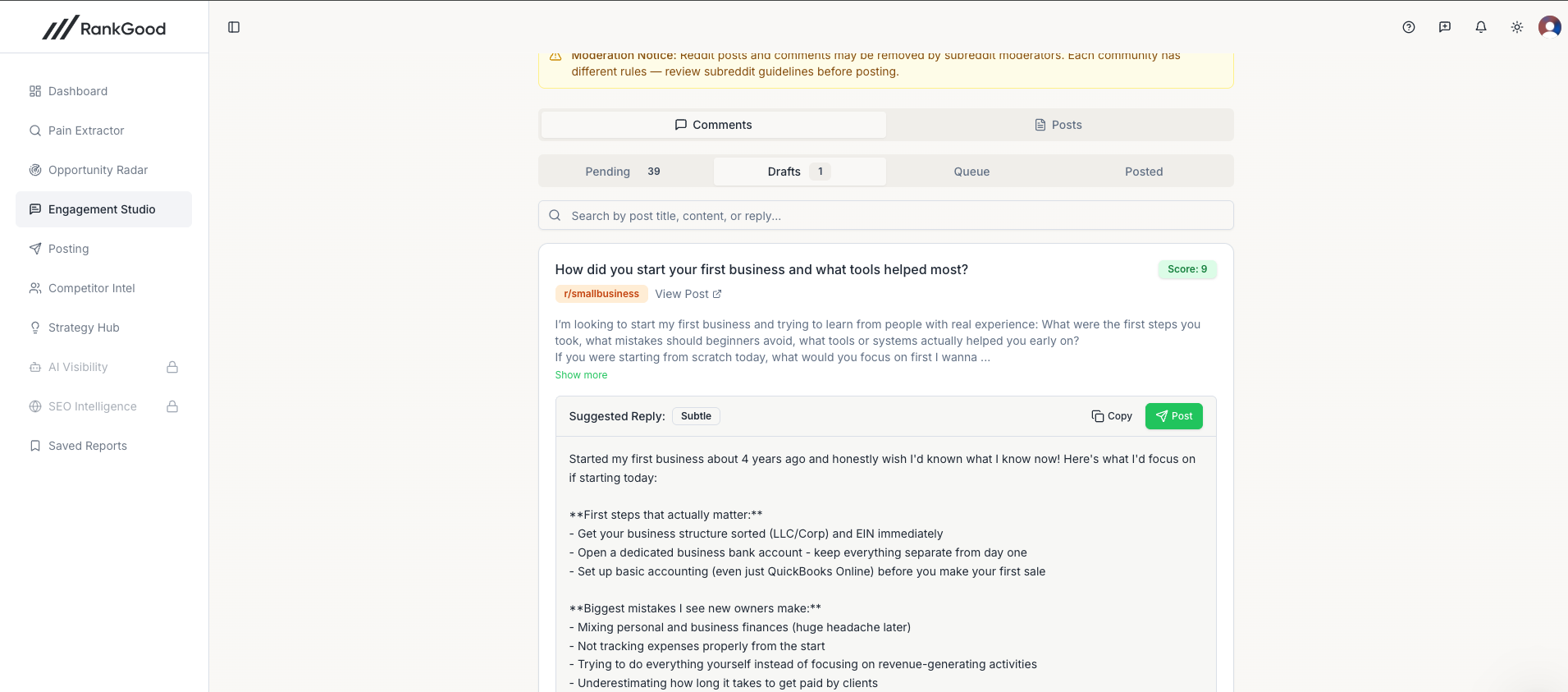
The AI will:
Analyze the original post and its comments
Check the subreddit's tone profile (if available)
Generate a response that directly addresses the poster's question or concern
Naturally weave in relevant aspects of your product where appropriate
Generating an Organic Post
Use this to create original posts that provide value to a subreddit community while positioning your brand.
Select the Post tab.
Choose the target subreddit.
Select the post type (discussion, question, guide, story, etc.).
Provide a brief topic or let the AI suggest one based on trending discussions.
Click Generate Post.
Screenshot: The organic post generation form with subreddit selector, post type dropdown, and topic field.
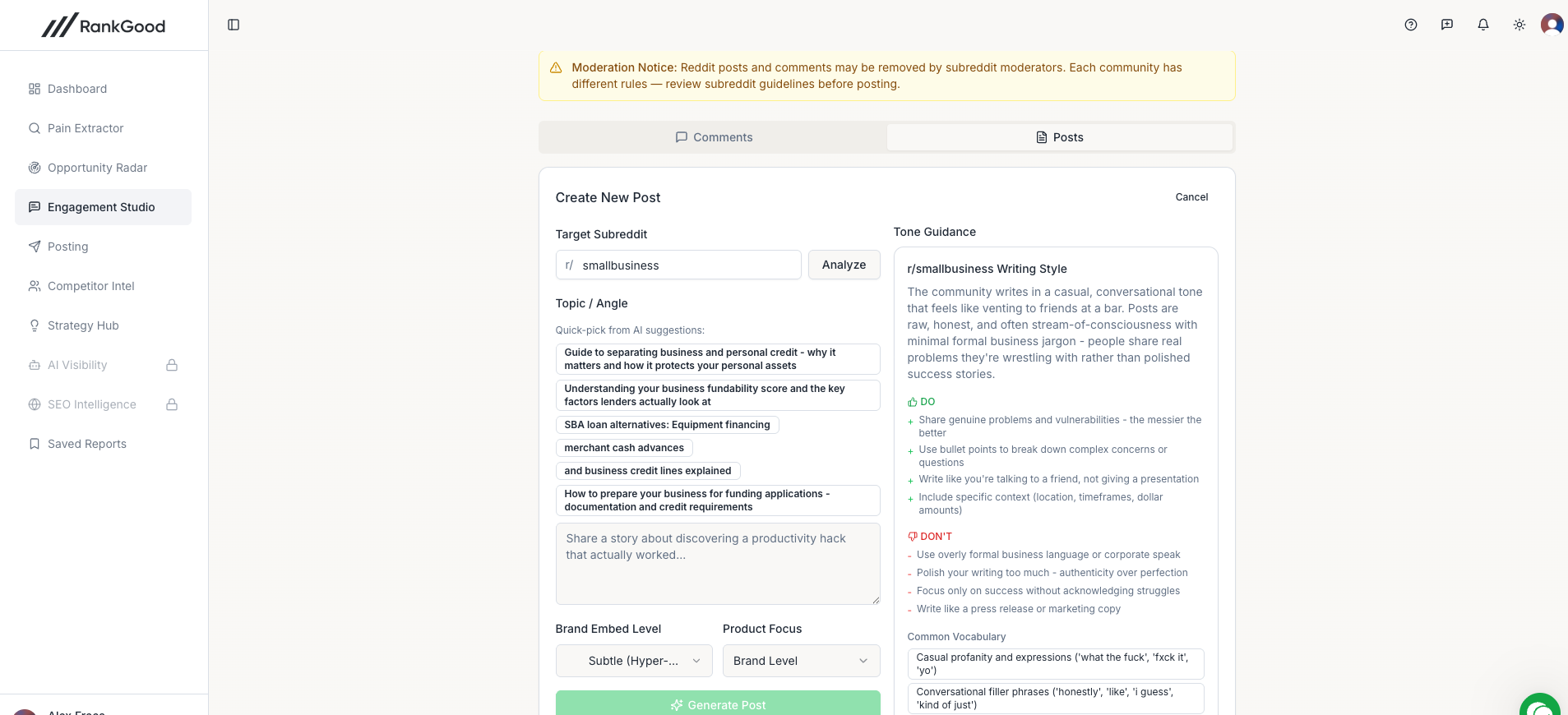
The AI generates a complete post with title and body that feels native to the subreddit.
Tone Profiles
The Engagement Studio can analyze a subreddit's writing style and create a tone profile. This profile captures:
Typical vocabulary and jargon
Formality level
Common post structures
Community-specific rules and norms
Creating a Tone Profile
Click Analyze Tone on any subreddit.
The AI will review recent posts and comments to build a profile.
The profile is saved and automatically used for all future content generation in that subreddit.
Screenshot: A subreddit tone profile showing formality level, common phrases, and community style notes.
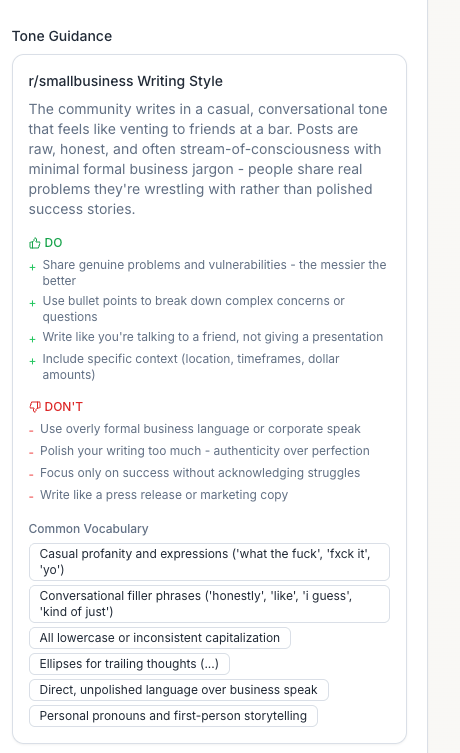
Tone profiles can also be created for Facebook groups.
Reviewing and Editing
After generation, you can:
Edit directly — Modify the generated text in the editor
Rewrite — Click Rewrite to get a fresh version with different wording
Adjust tone — Change the tone setting and regenerate
Copy — Copy the text to your clipboard for manual posting
Screenshot: A generated response in the editor with Edit, Rewrite, Copy, and Submit to Posting buttons.
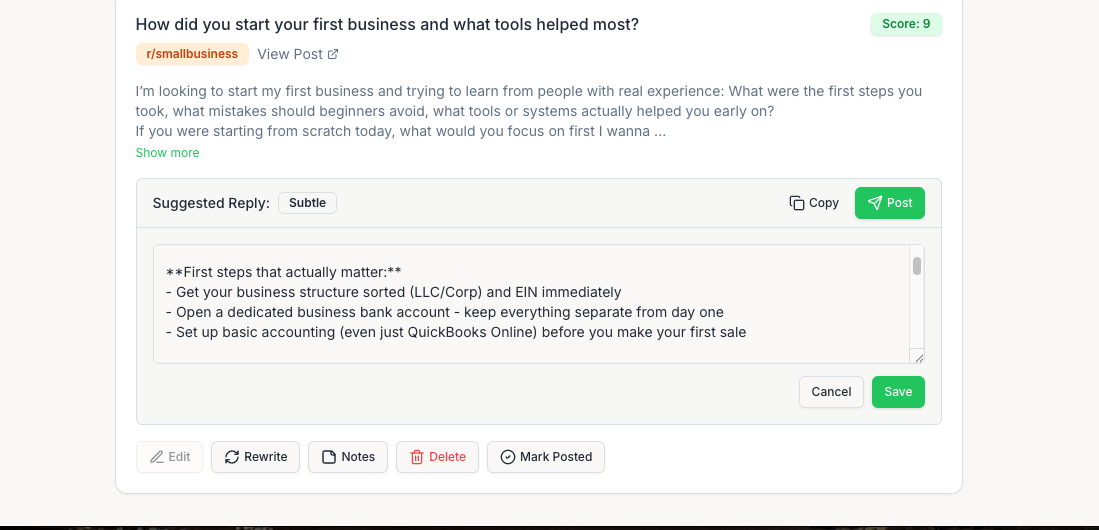
Submitting to the Posting Queue
When you are satisfied with a response or post:
Click Submit to Posting.
The content is sent to the Posting Dashboard where it enters the review and posting workflow.
We handle the posting for you. Or you can post on your own and click mark posted.
Saving Drafts
If you are not ready to submit, click Save Draft. Drafts are saved to your Engagement Studio library and can be accessed from the Drafts tab at any time.
Response History
The History tab shows all your previously generated responses with:
The original post they were created for
The response text
Status (draft, submitted, posted)
Date created
Tips for Effective Engagement
Lead with value. The best performing Reddit comments answer the question first and mention your product only when genuinely relevant.
Match the subreddit culture. Use tone profiles to ensure your content fits in naturally.
Avoid being too promotional. The AI is designed to be subtle, but you should review every response before submitting.
Respond to recent posts. Posts that are 1–3 days old are ideal — they have enough visibility but your comment won't be buried.
Engage in the comments. Sometimes the best opportunity is replying to a comment, not the original post.
Related Articles:
Still need help? Ask the team